Search screenshots by what you remember.

Cairn is a private screenshot search app for Mac. Capture a ticket, chart, thread, design, receipt, error, or idea as a searchable visual bookmark. Add a quick voice or text note, then find it later by what you remember. Everything stays on your Mac.

Download on the Mac App Store macOS 14+ · Apple Silicon · deliberate capture, not passive recording
The problem

Screenshot search should understand more than filenames.

The thing you need later is the chart Ivan sent, the exact error state, the Linear ticket, the Figma idea, the Slack decision, the invoice, or the UI you liked. Cairn saves those moments as searchable visual bookmarks.

1Screenshot 2026-05-18 at 14.22.07.png812 KB
2Screenshot 2026-05-18 at 14.31.49.png1.1 MB
3Screenshot 2026-05-15 at 09.14.02.png644 KB
4Screenshot 2026-05-13 at 11.42.13.png901 KB
5Screenshot 2026-05-12 at 17.05.58.png733 KB
1,279 more files

Now find the one with the chart Ivan sent on Tuesday.

How it works

Save. Tag. Search.

One shortcut. A quick voice or text note. A screenshot search bar that understands the way you actually talk about things.

01 · SAVE

Hit the shortcut.

Cairn saves the screenshot, runs OCR on what's visible, and starts listening — all in one move. No app to open, no window to focus.

+ + + R
02 · TAG

Name the moment.

Say it out loud. "Pricing chart from Ivan." Cairn transcribes it on-device and stores it next to the image. Don't feel like talking? Type it in the same field.

listening
03 · FIND

Type how you'd describe it.

You don't have to remember your exact words. Cairn matches on meaning, not on string equality — across your tag, the on-screen text, and the app where you saved the moment. Said "pricing chart from ivan"? Searching "that revenue chart Ivan flagged" still finds it. Misspellings are fine. Phrasing is fine. Yesterday is fine. Last quarter is fine.

pricing chart from ivan
See it

A screenshot search app that starts at capture.

A small floater for naming what just happened. A clean viewer for browsing and searching those moments later.
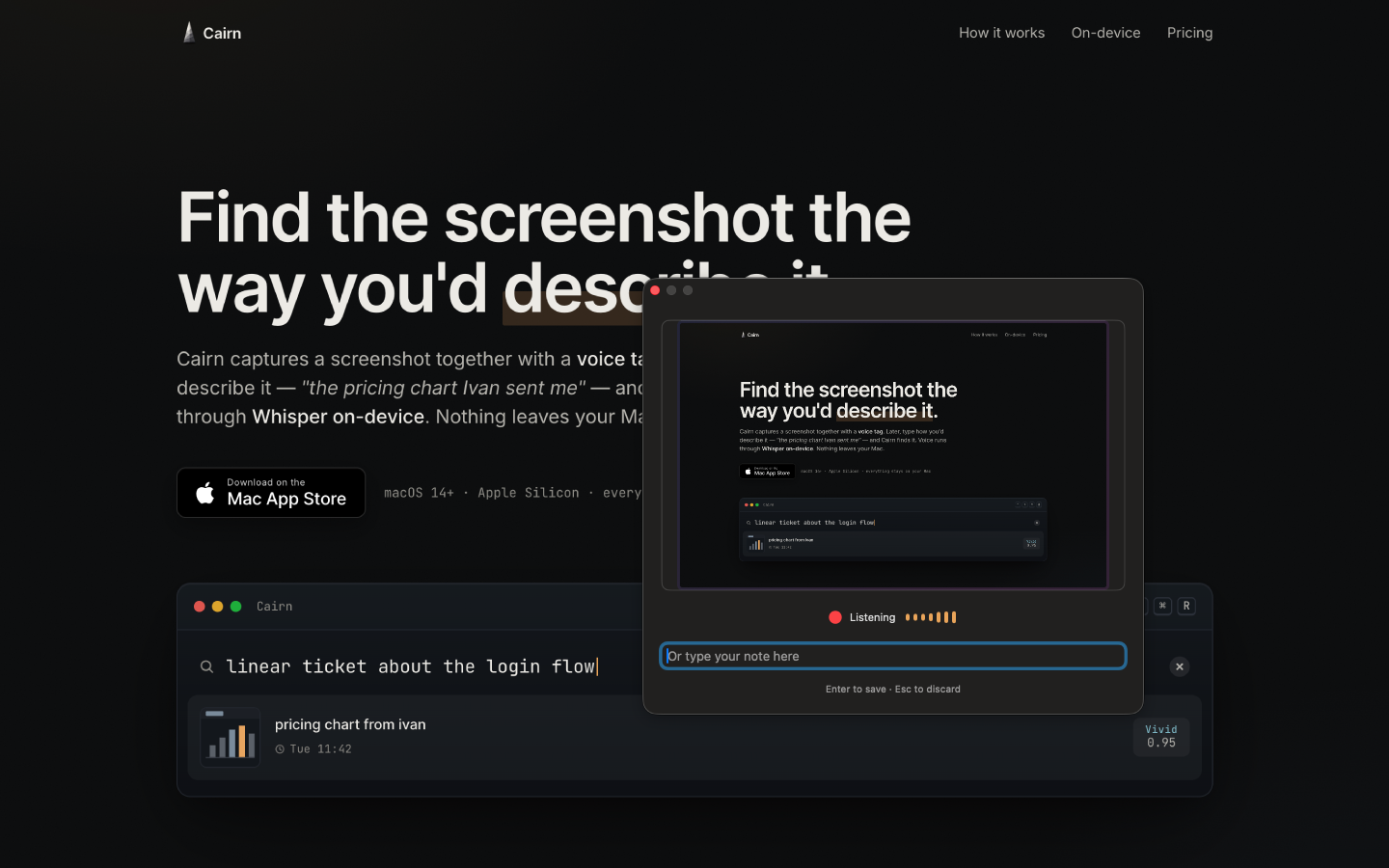
Cairn's capture floater appearing over the screen that was just captured. A small dark window says 'Listening' with an animated audio level meter, an 'Or type your note here' text field, and 'Enter to save · Esc to discard'. A preview of the captured screen sits above the floater.
Name the moment it happens. Hit the shortcut, the floater appears with a preview of what you just saved, talk for two seconds — or type. That’s it.
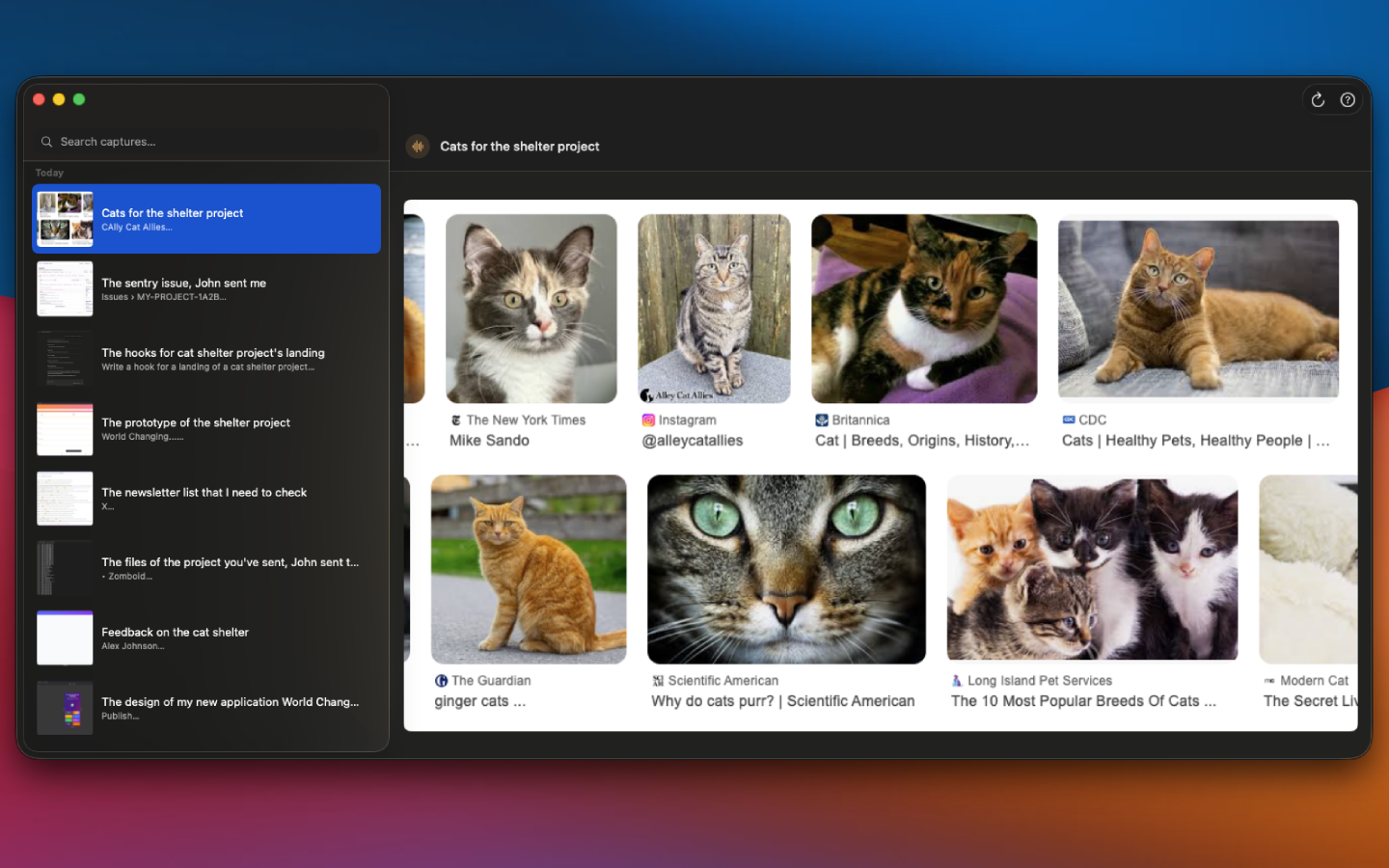
The Cairn viewer. A sidebar groups today's captures with thumbnails and voice-tag titles like 'Cats for the shelter project', 'The sentry issue, John sent me', 'The hooks for cat shelter project's landing'. The right pane shows the selected capture — a grid of cat photographs from a research session.
Browse like a notebook. Your notes become the titles. Today, yesterday, last week — the way you'd actually scan back through a week of work.
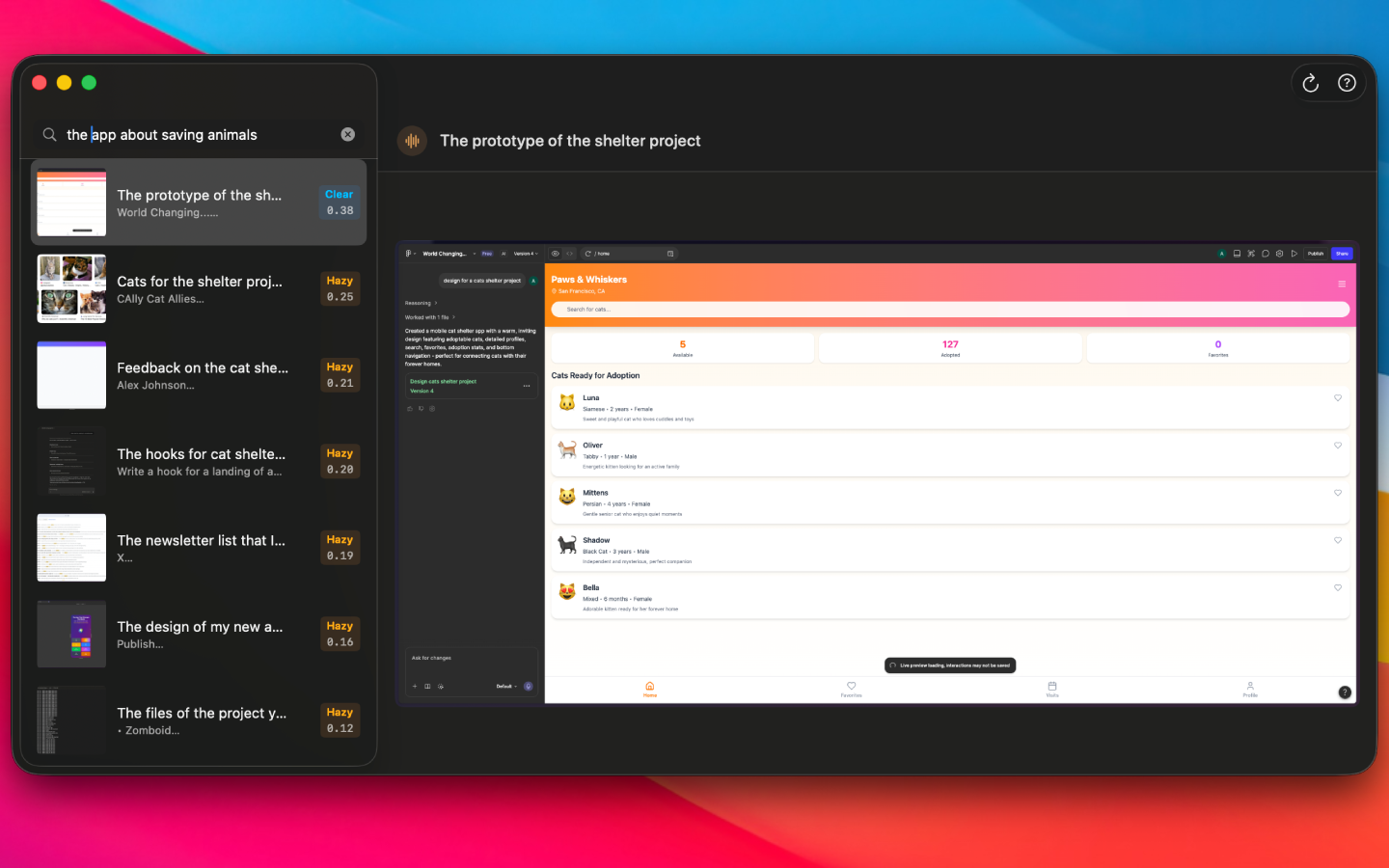
The Cairn viewer with the search 'the app about saving animals' typed in the sidebar. Matching captures are ranked by semantic similarity with Vivid, Clear, and Hazy badges. The selected capture, 'The prototype of the shelter project,' shows a screenshot of a cat-shelter mobile app being designed.
Search by memory, not filename. Type the way you remember the moment and Cairn ranks the matching captures by meaning.
The objection

Talking to your screen still feels weird.

So don't. The same shortcut takes voice or text — whatever the moment is for. Open-plan office, headphones in, AirPods in a meeting, kid asleep in the next room. Cairn doesn't care which mode you used; the tag is the tag.

On-device

Cairn is the deliberate, local-only alternative to passive recorders.

No Cairn account. No cloud sync. No Cairn-uploaded telemetry in the current App Store version. The app runs inside the macOS sandbox and writes to its own container.

AI outputs are model-generated and can be inaccurate. See the Privacy Policy for details.

~ · zsh
$ nettop -p $(pgrep Cairn) — no connections — $ lsof -i -P -p $(pgrep Cairn) — no entries — # app content stays local in the current App Store version
FAQ

The things people ask before buying.

What languages does the voice transcription support?
English only at launch. More languages will follow in later updates.
Which Macs does it run on?
Apple Silicon Macs (M1 or later) running macOS 14 Sonoma or newer.
What about my existing screenshots on disk?
Cairn doesn’t index them. It only indexes captures taken through its shortcut.
Does Cairn record passively or in the background?
No. Every capture is triggered by you pressing the shortcut. The microphone is only active while you’re tagging.
Does it work offline?
Yes. The current App Store version bundles the Whisper and MiniLM models, and on-screen text uses Apple Vision built into macOS.
What if I don’t want to talk?
Type instead. The capture floater takes voice or text in the same field.
Is Cairn free?
Yes. Cairn is free for now on the Mac App Store.
The deal

Free for now. No subscription. No login.

Free for now
  • Free for now. No recurring charge, no auto-renew, no seat counts.
  • Mac App Store. Download through Apple, with no Cairn account.
  • Updates included. App Store updates install through the usual macOS flow.
  • Works offline after install. No Cairn account or cloud service is required for capture and search.
Download on the Mac App Store

Requires macOS 14 Sonoma or later. Apple Silicon.